Quickstart
This walks through monitoring your first camera in about five minutes.
Start the dashboard
Open http://localhost:8000. By default the server only listens on this computer
(127.0.0.1). Settings, the database, snapshots and clips are stored in ./data.
Add a camera
Go to Settings → Cameras → Add camera and enter a source:
| Source | Example |
|---|---|
| A webcam | 0 (the first webcam), 1, … |
| A video file on the server | C:\videos\site.mp4 or /home/me/site.mp4 |
| An IP camera (RTSP) | rtsp://user:password@192.168.1.20:554/stream1 |
| An HTTP/MJPEG stream | http://192.168.1.21:8080/video |
Press Start on the camera's card in Live. The first start downloads the model, which takes a few seconds.
No camera at hand?
Use any video of people at work as a file source and tick Loop video files, or try the Analyze page with a photo.
Read the live view
Each worker gets a box and a label such as #12 Helmet:ok Vest:NO:
- Green: wearing everything that is required.
- Orange: something looks missing, waiting out the delay before calling it a violation.
- Red: a violation is open.
- Grey: required items can't be seen, or the worker is outside every PPE zone.
The chips under the video show the same per worker, and Live events lists violations as they open and close.
Choose what is required
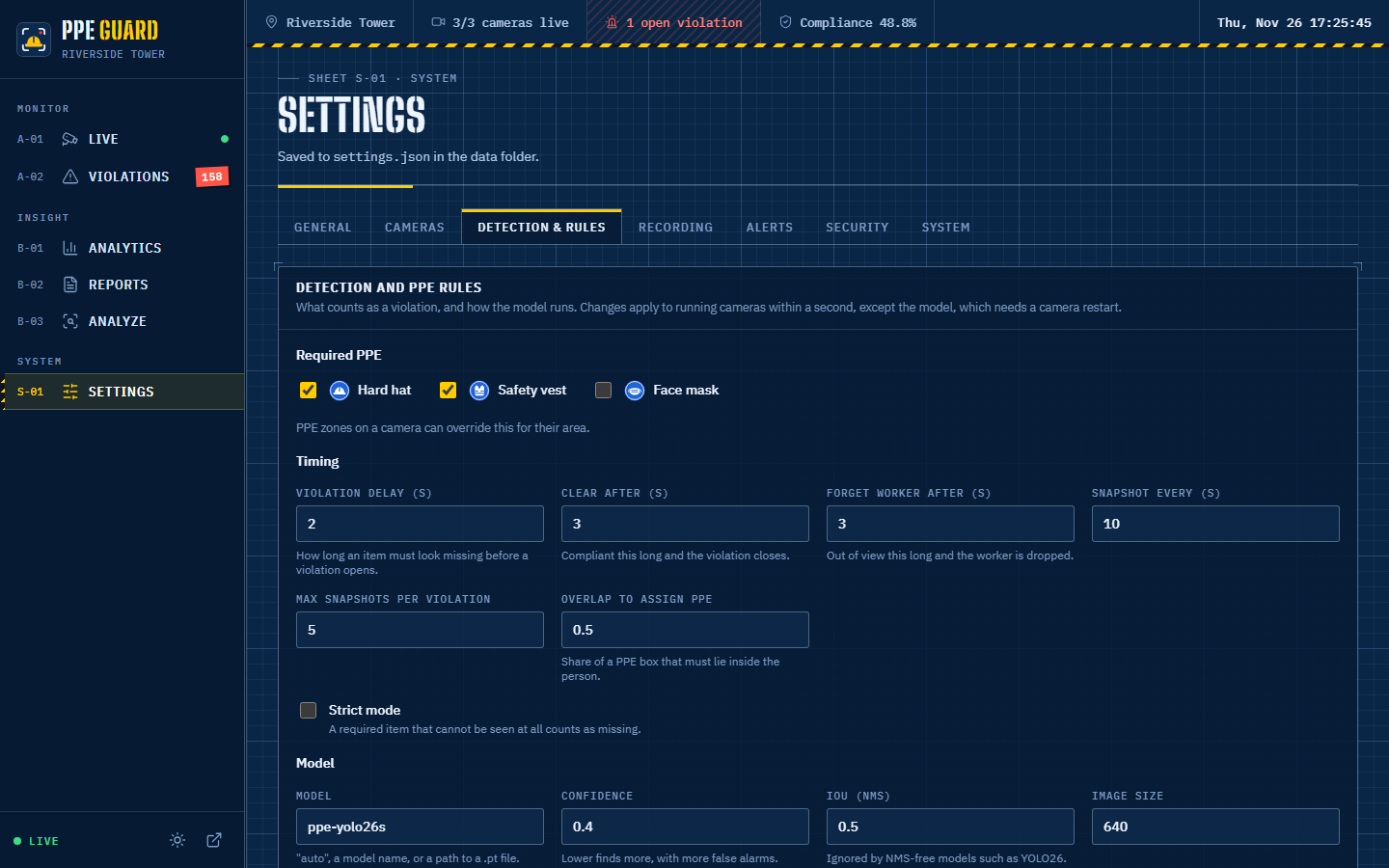
Settings → Detection & rules sets which items every worker needs (hard hat and vest by default) and the timing:
- Violation delay: how long an item must look missing before a violation opens (2 s). This filters out single bad frames.
- Clear after: how long a worker must look compliant before it closes (3 s).
To require PPE only in part of the picture, or to keep people out of an area, draw zones.
Review violations
Open Violations to see each one with its snapshots and video clip. Add a note and tick Reviewed to keep a record of what was done. Export CSV gives you a spreadsheet for audits.
Get alerts
Paste a Slack or Discord webhook into Settings → Alerts and press Send a test alert. See Alerts.
Before you open it to your network
To reach the dashboard from other devices, start it with --host 0.0.0.0, but set a password
first:
See Security and Running in production.
Check files from the command line
ppe-guard predict runs the same checks without the dashboard:
ppe-guard predict site-photo.jpg                     # one image
ppe-guard predict photos/ --save out/                # a folder, with annotated copies
ppe-guard predict shift.mp4 --save out/              # a video, printing violations as they happen
ppe-guard predict rtsp://192.168.1.20/stream1 --show # a live stream in a window
Add --fail-on-violation to get exit status 1 when anything is found, for scripts.